How to Send Technical Indicator Alerts from MetaTrader to Autobot
To automate trading based on your rules and logic, built by you or based on the indicators you follow.
1. Download AutoSignal Connector
Download the "AutoSignal_connector" file. You'll find two versions: one for Meta Trader 4 (.ex4 file) and one for Meta Trader 5 (.ex5 file). Choose the version that matches your Meta Trader platform.
2. Place AutoSignal_connector into the 'Script' folder
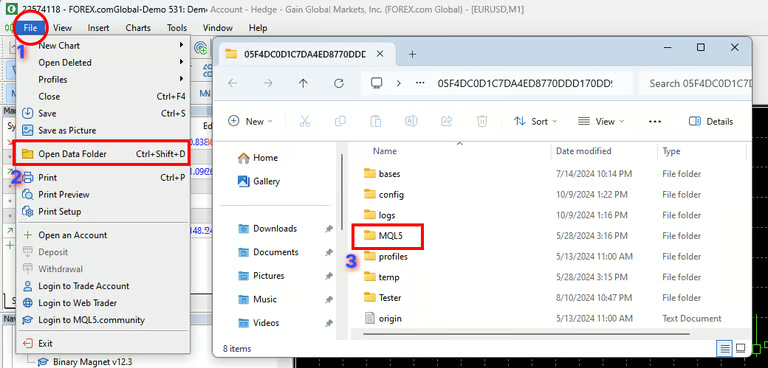
To integrate the AutoSignal_connector file into MetaTrader 5, open the platform, go to File > Open Data Folder, then navigate to the MQL5 folder. Inside, find the Scripts folder and place the AutoSignal_connector file there. Restart or Refresh MetaTrader 5 to complete the integration.
3. Enable WebRequest
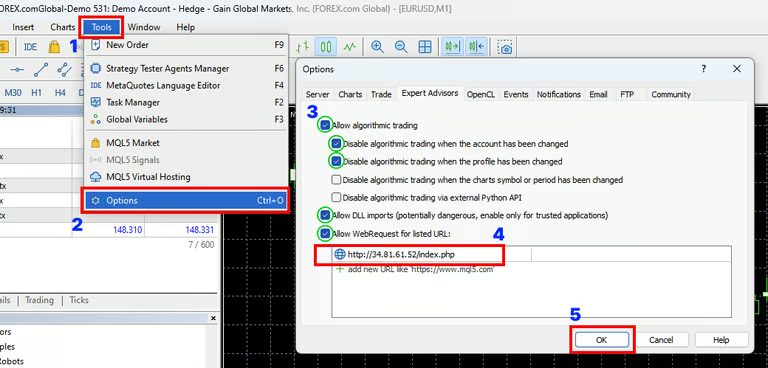
To enable WebRequest in MetaTrader 5, go to Tools > Options, then under the Expert Advisors tab, check Allow algorithmic trading, Allow DLL imports, and Allow WebRequest for listed URL. Paste the URL below into the WebRequest URL list, then click OK to save and close.
http://34.81.61.52/index.php
4. Add AutoSignal_connector to Chart
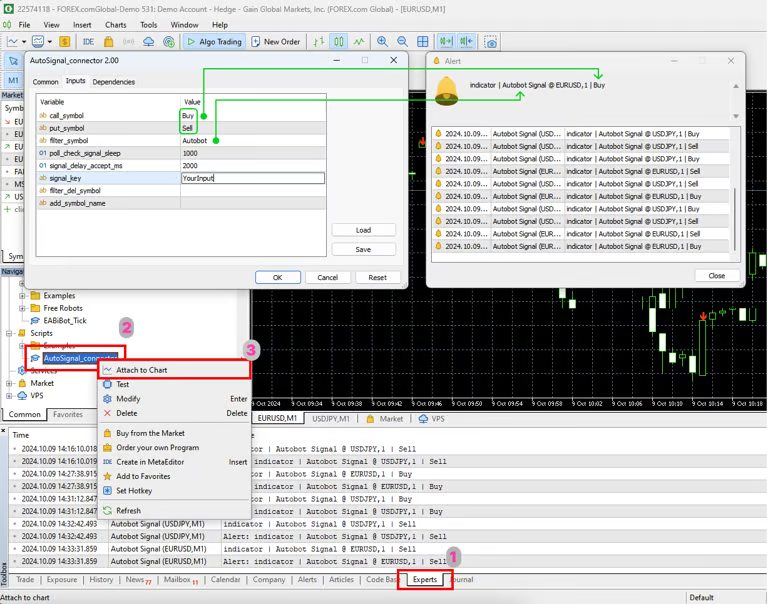
Before adding AutoSignal_connector to your chart, first click on Experts in the Toolbox menu at the bottom to view log messages. Then navigate to Scripts, locate AutoSignal_connector, right-click it, and select Attach to Chart. Once the AutoSignal_connector window opens, go to the Inputs tab and start configuring the settings as follow:
A. call_symbol / put_symbol:
Input the exact alert messages from your indicator that execute the trade (this must match your alert settings).
B. filter_symbol:
Enter the name of the indicator or text that represents the indicator you're using.
C. signal_key:
This functions like a password. Enter any text or letters, but ensure that you input the exact same signal key in your Autobot's Signal Key field, or the bot won't recognize your alert.